Sometimes, you don't want to hear the whole song again.
There are moments when a listener wants to hear just one part of a song.
It could be a favourite chorus, a difficult lyric, a particular musical phrase or a section they are trying to learn.
But most conventional music players are designed around navigating an entire track. Replaying a short section often means manually dragging the progress bar, estimating timestamps or listening through the song again.
The opportunity: Make repeating a specific section of a song a simple, precise and accessible interaction.
I started by understanding how people listen to music.
Before designing the interface, I created a survey to understand how frequently people wanted to replay specific sections, what they currently did and what made the process difficult.
The survey received 101 responses.
I explored five areas:
- Music listening habits and preferred platforms.
- Frequency of wanting to repeat a specific section.
- Existing workarounds.
- Problems with current replay methods.
- Interest in a dedicated A–B looping feature.
Who responded?
The sample was predominantly young listeners.
Single selection · n = 101. Percentages may not sum to 100% due to rounding.
Primary listening platforms
Single selection · n = 101. Other includes seven remaining responses, including free-text answers; no responses excluded.
This was exploratory research across music listeners, not a representative sample of YouTube Music users.
Finding 01 — Repeating sections is a common behaviour.
86 out of 101 respondents (85.1%) said they wanted to repeat a specific portion of a song either sometimes or very frequently.
Single selection · n = 101. Percentages may not sum to 100% due to rounding.
This suggested that the behaviour was not limited to a small group of specialist users.
Finding 02 — People already have workarounds, but they involve manual effort.
When asked what they currently did to replay a particular section:
Single selection · n = 101. Percentages may not sum to 100% due to rounding.
The most common workaround was manual progress-bar navigation, selected by 65 respondents (64.4%).
Finding 03 — Precision is a major source of friction.
When asked about the biggest problem:
Single selection · n = 101. Percentages may not sum to 100% due to rounding.
Together, finding the exact starting point and repeatedly rewinding accounted for 68 responses (67.3%).
Key insight: The opportunity wasn't simply to add another playback button. It was to make the selection of a specific time range more precise and less repetitive.
Finding 04 — There is interest in a dedicated looping feature.
When asked whether a feature for selecting and automatically repeating a portion of a song would be useful:
Single selection · n = 101. Percentages may not sum to 100% due to rounding.
86 respondents (85.1%) rated the idea at least moderately useful.
Additionally, 79 respondents (78.2%) said they would be likely or very likely to use it if available in their music app.
These results indicate stated interest, not proof of actual adoption.
Single selection · n = 101. Percentages may not sum to 100% due to rounding.
Finding 05 — Users want control over their selection.
Preferred selection methods:
Single selection · n = 101. Percentages may not sum to 100% due to rounding.
The results suggested that an adjustable timeline would be a familiar and promising interaction to explore.
Other capabilities respondents selected included:
Multiple selections allowed · n = 101; bars show the percentage of respondents. One respondent selected both “None of these” and sharing; both selections are retained. These are stated preferences, not validated feature demand.
These were multiple-selection responses. Saving sections emerged as the most popular additional capability, but I kept the initial concept focused on the core looping experience.
Turning research into a design direction.
Based on the findings, I focused the concept around one central task:
Let listeners select a portion of a song and repeat it without repeatedly navigating the track.
I established four design goals:
- Easy to discover — Make the looping feature accessible from the familiar Now Playing experience.
- Precise selection — Allow users to define the beginning and end of a loop.
- Clear feedback — Make the selected range and timestamps easy to understand.
- Minimal interruption — Keep the experience within the music player rather than sending users to another tool.
The core interaction
The intended experience follows a simple sequence:
- Open the Now Playing screen.
- Activate the Loop feature.
- Select the beginning and end of a song segment.
- Preview the selected section.
- Start repeating the selection.
Keeping the experience familiar.
I chose to explore Loop within the existing YouTube Music Now Playing interface rather than creating an entirely separate music player.
This allowed the concept to build on familiar playback controls and album artwork, while introducing a new interaction only when needed.
Screen 01 — Now Playing
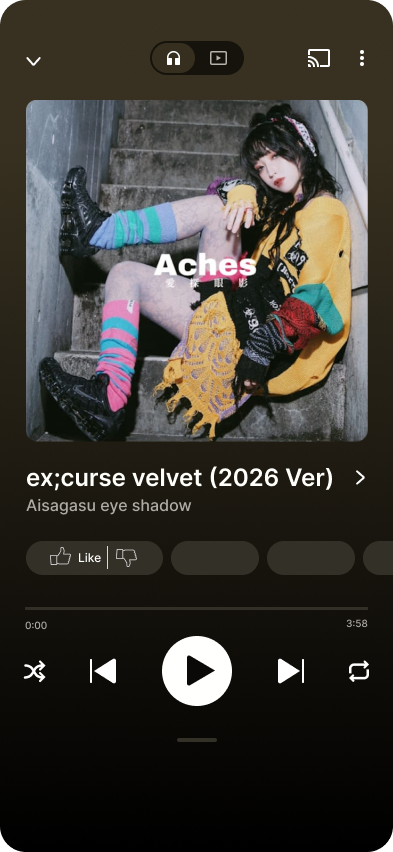
The first screen establishes the familiar listening experience. The album artwork, song details, progress bar and playback controls remain the main focus.
The goal was to avoid changing the user's normal listening behaviour before they chose to use Loop.
Screen 02 — Discovering Loop
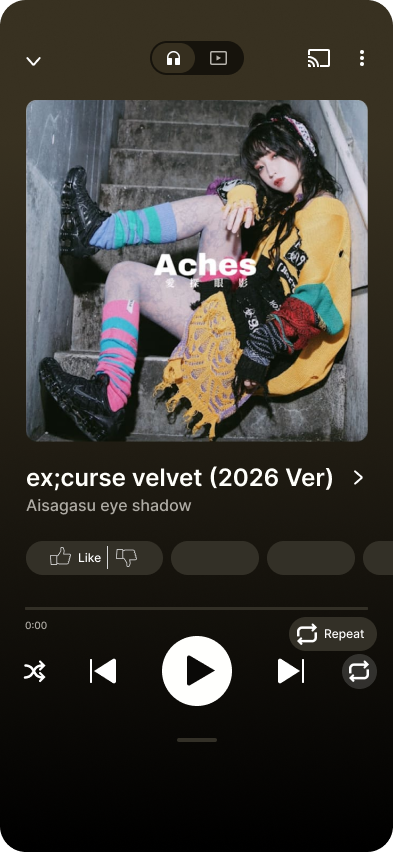
The Loop entry point is introduced alongside the existing playback controls.
Once activated, the interface communicates that the player has entered a custom looping mode.
This keeps the feature close to the playback experience instead of making users navigate through multiple settings.
Screen 03 — Selecting a segment
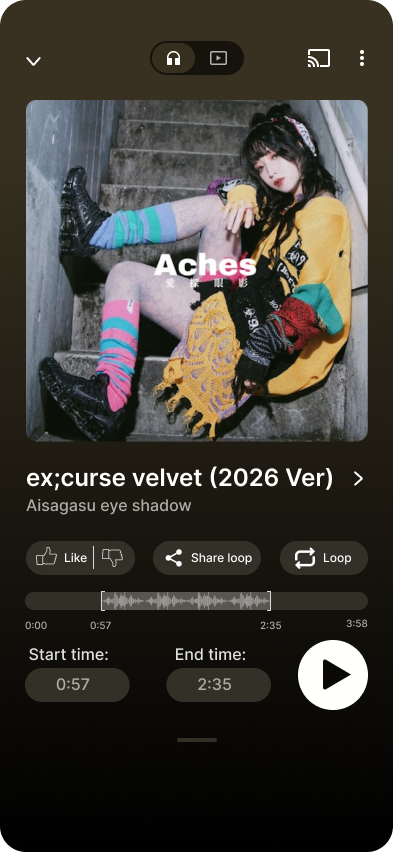
The selection interface introduces:
- A timeline with adjustable start and end points.
- Visible start and end timestamps.
- A selected range between the two points.
- A preview/playback action.
The user can adjust the selected section and understand which part of the song will be repeated.
The waveform exploration adds another visual layer to help users understand the audio segment they are selecting.
Design principle: Make the selected portion visually obvious, so users do not have to rely only on remembering timestamps.
From static screens to an interactive experience.
After designing the interface in Figma, I wanted to move beyond a static presentation and create a functional web prototype.
I used ChatGPT as an AI-assisted frontend development tool to implement the experience. I directed the design and interaction decisions, reviewed the implementation and tested the resulting functionality.
Explore Loop: https://loop-two-chi.vercel.app/
The prototype explores the following capabilities:
- Loading a song through a music link.
- Accessing the Loop interaction from the player.
- Selecting start and end timestamps.
- Adjusting a custom playback range.
- Previewing and controlling the selected loop.
- Editing or resetting the selection.
The implementation is an independent concept and is not integrated into the official YouTube Music application.
Checking the experience beyond the design file.
I tested the implemented prototype to check that its core interactions worked as intended.
The testing focus was on:
- Whether the Loop entry point was accessible.
- Whether users could define and adjust the selected range.
- Whether timestamps reflected the selection.
- Whether the preview and loop controls behaved as expected.
- Whether the selection could be edited or reset.
The prototype has been personally checked for functionality. Formal usability testing with recruited participants and comparative usability metrics have not yet been established.
A small interaction can reveal a larger design opportunity.
This project helped me explore how a seemingly minor inconvenience can affect everyday product experiences.
A few important learnings:
Research should shape the interaction. The survey helped identify precision and repeated manual navigation as important problems to address.
Familiarity matters. Introducing a new feature within an existing player can reduce the learning required to use it.
A prototype should demonstrate behaviour. Building a functional prototype made it possible to explore the interaction beyond static screens.
Not every requested feature belongs in the first version. Although respondents expressed interest in saving and sharing loops, I kept the initial concept focused on selecting and repeating a segment.
If I were to take Loop further, I would explore:
- Usability testing with both regular listeners and musicians.
- More precise waveform-based selection.
- Saving and naming frequently repeated sections.
- Sharing a selected section with another listener.
- Accessibility improvements for timeline controls.
- Testing the interaction across different screen sizes and listening contexts.
Final thought
Loop began with a simple observation: sometimes, people want to hear just one part of a song.
The project became an exploration of how research, interaction design and prototyping can turn that small frustration into a more considered listening experience.
Loop — Your favourite part, again.
Survey source: Music Listening & Repetition Habits (Responses), 101 responses. Charts are calculated from the supplied workbook. Age bands 22–25, 26–30 and above 30 are combined as 22+. Aggregate results only are presented.